Saturday, April 25, 2020

How to write ku in preeti font


To Type कु in Word Using Preeti Font 

when you try to type कु then you will see typing like this क' so you have to change some settings in the word.

Open word and click on the file, you will see word option or only option as shown in fig 

and click on the "option" new pop up will open  as shown in the fig


and you will there proofing in the left side , click on it and then on the auto correct option and new popup will open.

After that un-check the straight quotes with smart quotes and save it.
Now you can type कु।

Nepali Typing Skills

It is easy to learn English Typing but hard to learn Nepali Tying and it requires passion and time to learn Nepali Typing. In this Article you will to trip and tricks which helps you to learn Nepali Typing easily and quickly.
1. To learn Nepali Typing you must have good knowledge of English Typing 
       There are only 26 letters in English language but Nepali language contains 36 letters so you must know typing skill of number rows which helps to typing fast in Nepali Language.
2. Type regularly for at least one hour a day.


Now you must have do some settings so that you can typing letters correctly in the word such as कु

How To Type कु In word


Friday, April 3, 2020

Word Shortcut Keys From A to Z

Shortcut keys are easier to use and save the maximum time while editing the document and makes us look like as pro.Lets looks the all the shortcut keys used in the word that can be useful while using the word document.

Ctrl + A = Select all the text in the word
Ctrl + B = Makes the selected word Bold
Ctrl + C = Copy the selected text to be paste
Ctrl + D = Opens the font dialog box
Ctrl + E = Makes the text alignment center
Ctrl + F = To find anything in word
Ctrl + G = Go to option to go to required page
Ctrl + H = Find and replace text
Ctrl + I =  Makes the selected text Italic
Ctrl + J = Justify the paragraph where cursor is placed
Ctrl + K = Makes  the hyperlink text
Ctrl + L = Left alignment
Ctrl + M = Paragraph Indent i.e Gives space in left side of the paragraph
Ctrl + N = Opens new document file
Ctrl + O = Open the open dialog box to choose the file you want to open
Ctrl + P = Print the document
Ctrl + Q = Removes the paragraph indent
Ctrl + R = Right alignment
Ctrl + S = Save the file
Ctrl + T = Hanging indent i.e leaves the first line of paragraph and shift all other line to right
Ctrl + U = Underling the text
Ctrl + V = Paste the copied text
Ctrl + W = Close the open file
Ctrl + X = Cut the selected text
Ctrl + Y = Redo for forward action
Ctrl + Z =Redo for backward action

Wednesday, March 18, 2020

Public Service Commission ( Loksewa Aayog )

This post is for the helping all the student who are preparing for loksewa aayog examination.I have posted all the important links where you can find the stuffs for your preparation .


For the old question or model question you can follow the given links or click on the following topics.

1.lok-sewa-aayog-officer-level-questions

2.lok-sewa-aayog-assistant-level-questions


If You are preparing for the post of Computer operator then the most useful website for mcq question here .

1. Computer Operator Loksewa

All above links are of website now lets look over some you-tube channels so that you can understand the tips and tricks to solve the questions easily and within no time.

1. Teach For Nepal

2.Nepal Smart Loksewa

3.Loksewa Gyan

Saturday, March 14, 2020

FTTX Fiber Network


How To Add Two IP Address To Single Computer

Everyone who are engaged in the computer world must know to assign ip address to the computer either ipv4 or ipv6.
But it is possible to assign two ip address to the single computer .To do so, follow the steps as below:

Step 1: Open the network adapter settings and choose the adapter in which you want to add ip address mostly in the ethernet adapter.

Step 2:Right click on the adapter and click on the properties .

Step 3: Find the options internet protocol version 4 to add ipv4  address and click on that and new tab will pop up.

Step 4: At the bottom right corner, you will see the advance option click on it.
Step 5: Now you will see new pop up tab and click on the add option to add the different ip address .Please note that subnet mask should be same .

Monday, March 9, 2020

BDCOM OLT Configuration

BDCOM OLT Configuration

Login to the Bdcom Olt 

Command To See About Interface

Show interface brief 

Command to see ip interface

show ip interface brief

Command to see active onu

show epon active-onu 

Command to see offline onu

show epon inactive-onu

Command to see active onu of particular epon

show epon active-onu interface epon 0/1 (replace 0/1 with another interface as your requirement)

Command to see signal at onu end

show epon optical-transceiver-diagnosis interface EPON 0/1
show epon interface ePON 0/1:4 onu ctc optical-transceiver-diagnosis

Command to see mac address of connected onu to the Pon

show epon active-onu ( This show list of mac address along with the active onu)

Command to see mac address table of the OLT

show mac-address-table dynamic 
show ma-address-table
show mac address-table brief


Monday, February 17, 2020

How To Add links To Images In Blogger

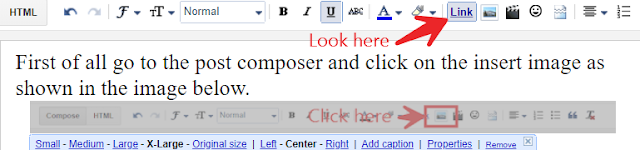
First of all go to the post composer and click on the insert image as shown in the image below.

Insert anyone images as your wish.Click on the image that you have inserted in the post and you will see link option is highlighted  like in the image

then click once on that highlighted option and then it will be un-highlighted after that click again to that image but now you see that link option is not highlighted.Then click on that link option again there you will see pop up where you can add your link address like this in the image.

Now you can save and publish the post and check it .The image link will not work in the preview mode so you have to publish before checking.

How To Block Ads Permanently On Youtube

Everyone is surfing internet daily and they are engaged with internet all the time.Many companies provide free service to the users even they have to pay for the maintenance ,equipment and manpower. They earned money by the advertisements which is the main source of their company.We can take example as Youtube , Facebook ,Instagram etc.

 But sometimes users like us do not like ads that comes in. We want to enjoy the content with out ads. And then Question arise   How To Block Ads Permanently ? 

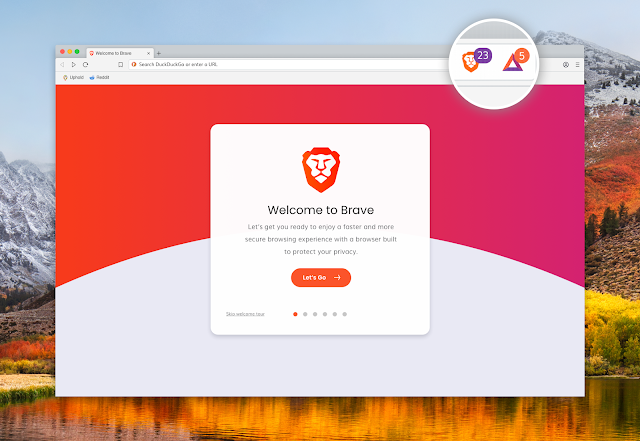
 There are different ways to block the ads on your browser like adding ad-blocks in browser.But some ad-blocker stops working or tells to upgrade the premium version which may be expensive.The permanent solutions is Brave Browser which has in-built ad-blocker.
Brave Browser


You can permanently block all the ads which comes while surfing the internet.To Download Goto Brave Browser .

How To Block Ads On Youtube?

 Now we are able to block the in the browser but how to block on youtube ?


 Well we can block all the youtube ads by downloading youtube vanced application for android phones.Just click on the link to download Youtube Vanced
After that you need to download MicroG software to support this app.You can click on image or given link below the image.
MicroG

Click Here   Download Micro-G 

Now the youtube without any ads .You can watch video also to know to use these application.


Friday, February 14, 2020

How To Transfer File From Mobile To Laptop Without USB Cable

Now everyone is using smart phone and laptop all over the time and habituated to both of them. People do a lot of things from mobile like snaps pictures and video from their phone.People feel more handy to use mobile phones rather than laptop for downloading video or file from the internet. And they transfer the files to the computer for security or privacy or due to the lack of space in the phone.They uses USB cable for file transfer from phone to laptop or PC.Sometime people do not have USB cable with them to transfer file.
 Now we can make our phone as FTP server and can transfer file from phone to laptop or PC with us e of wifi. Actually it does not require internet connection but need to connected to the same wifi.

To do so you need to install Wifi FTP server application from the playstore to you phone. You can search in the playstore of your phone or click on Download FTP Server.


Install it and open the app and click on the start. You will see the server URL which you have to type in the address bar of any browser and hit enter.


15 Shortcut Keys You Must Know

1. win + e                 = To open file explorer
2. win +   s               = To open search bar
3. win + r                 = To open run command
4. win + prt sc          = To print screen 
5. win + d                 = To show the desktop
6. win + x                 = Quick link menu
7. ctrl + e                  = search in the browser
8. ctrl + shift + esc   = To show the task manager 
9. ctrl + c                  = copy the selected things
10. ctrl + v                = paste the copied things
11. ctrl + tab             = To move next open tab in browser 
12. ctrl +shift + tab   = To move back open tab in browser 
13. alt + tab              = To switch between open tabs 
14. ctrl + shift + t     = open the closed tab
15. win + l                = To lock the computer

Top Five Browser

1 . Brave Browser Brave  Browser   is one of the best browser in the list even it is similar to all other browser because it has one of ...